Calorie counter app for Indian food: log meals from a photo
Home-cooked dal, rotis and sabzi trip up many calorie apps. See how photo logging works in Trainaq's free client app, where AI reads the meal and you confirm it, plus honest logging tips.
A calorie counter app for Indian food has to cope with home cooking: rotis of every size, dal of every thickness and sabzi made with a different amount of oil in every kitchen. A practical way to log it is to photograph the meal, let the app read it and then fix anything it misread, which is how the free Trainaq client app works. This guide covers why generic apps struggle, how photo logging works and how to log Indian meals honestly.
Disclosure: NutraCore is affiliated with Trainaq.
Key Takeaways
Home-cooked Indian food is hard to log in many calorie apps, because the same dal, roti or sabzi changes from kitchen to kitchen.
In Trainaq, AI reads a meal photo and suggests the food and amount; you confirm or correct it before anything is logged.
Food search and barcode scanning (via Open Food Facts) cover packaged foods, and Indian foods come in household measures like a katori.
Clients use Trainaq free of charge; your coach, on Trainaq Coach, sets the calorie and macro targets you log against.
Why does a typical calorie counter app struggle with Indian food?
Calorie counter apps struggle with Indian food because home cooking doesn't come in standard servings. A katori of dal, a roti or a plate of sabzi changes with the cook, the oil and the region, and the same dish goes by several names. A database entry is only an average, so your log drifts unless you check portions.
Katoris, rotis and the size problem
A katori in one home can hold noticeably more than in another, and a thin phulka is a different thing from a thick tawa roti or a paratha made with ghee. When an app asks for "1 serving", it has to guess which you mean. Weighing your usual katori and a typical roti once on a kitchen scale tells you what your portions really are, and that knowledge carries into every meal you log afterwards.
Dal and sabzi depend on the cook
Two bowls of dal can look alike and still differ a lot in calories: one thin with a light tempering, the other thick, with a generous ghee tadka and a swirl of cream. Sabzi works the same way, since a lot of its calories can come from the cooking oil rather than the vegetables. That makes the fat in the pan the item most worth getting right when you log home food.
Regional dishes with many names
Indian food changes every few hundred kilometres. Poha, upma, pesarattu, thepla, appam, litti and misal each come in home and restaurant versions, and many dishes have local names a search box may not recognise. Bhindi, okra and vendakkai are the same vegetable, but a generic app might only know one of those words.
How does photo logging work in Trainaq?
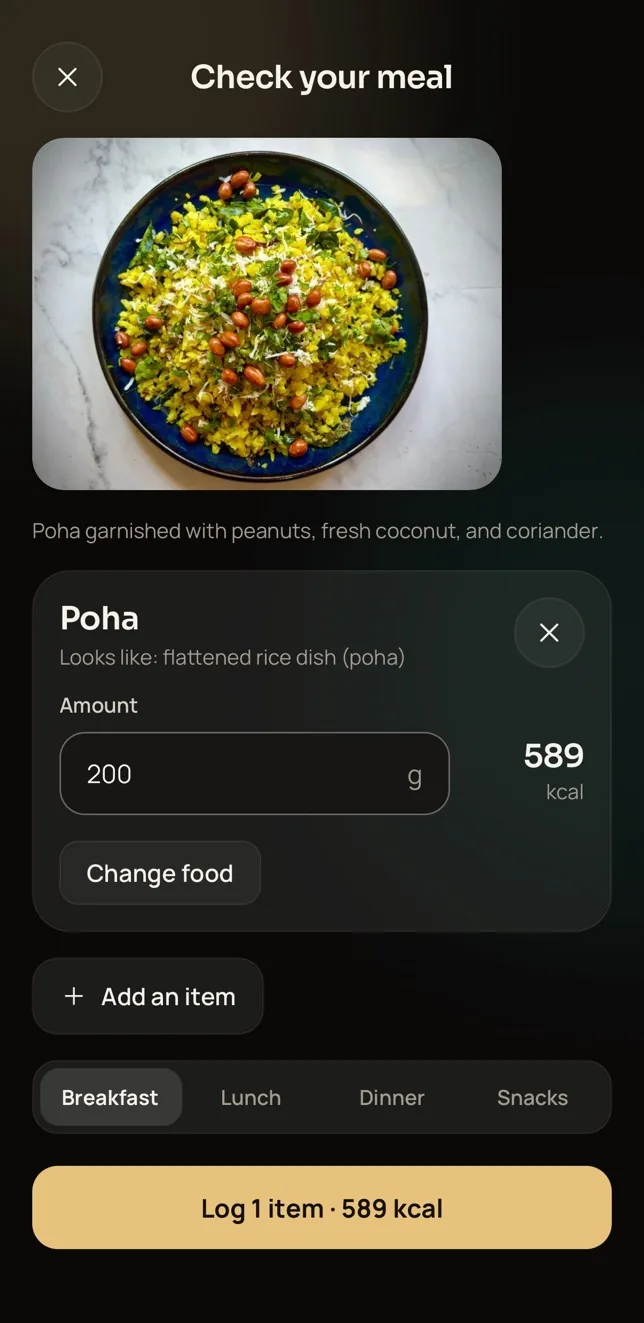
In Trainaq, you photograph your meal in the Food tab and AI reads what's on the plate, suggesting the food, an amount and its calories. Nothing is logged until you check it. You confirm the food and the amount, or correct them, and the entry goes into your food log, where your coach can see it.
Checking the poha example
Take the screen above. The AI has read the photo as poha, 200 g, 589 kcal, and it's waiting for you. Before you confirm, ask two questions. Is it really poha, or is it upma? Was the plate really about 200 g? If your portion was smaller or larger, change the amount; if the dish is wrong, change the food. Then confirm, and it's logged.
Why you still check every photo
A photo can't see inside your food. It can't tell how much ghee went into the dal, whether the chai had two spoons of sugar or if there's a second roti hiding under the first. That's why Trainaq asks you to confirm instead of logging on its own: the AI does the typing in seconds, and your knowledge of the meal fills the gaps. You can read more about how Trainaq's AI food photo logging works.
Photo tips for better readings
Shoot from above in decent light, keep the whole plate in the frame and spread items out a little so one doesn't hide another. If something sits in a covered dabba or a glass you can't see into, add it separately by searching for it.
What your coach sees
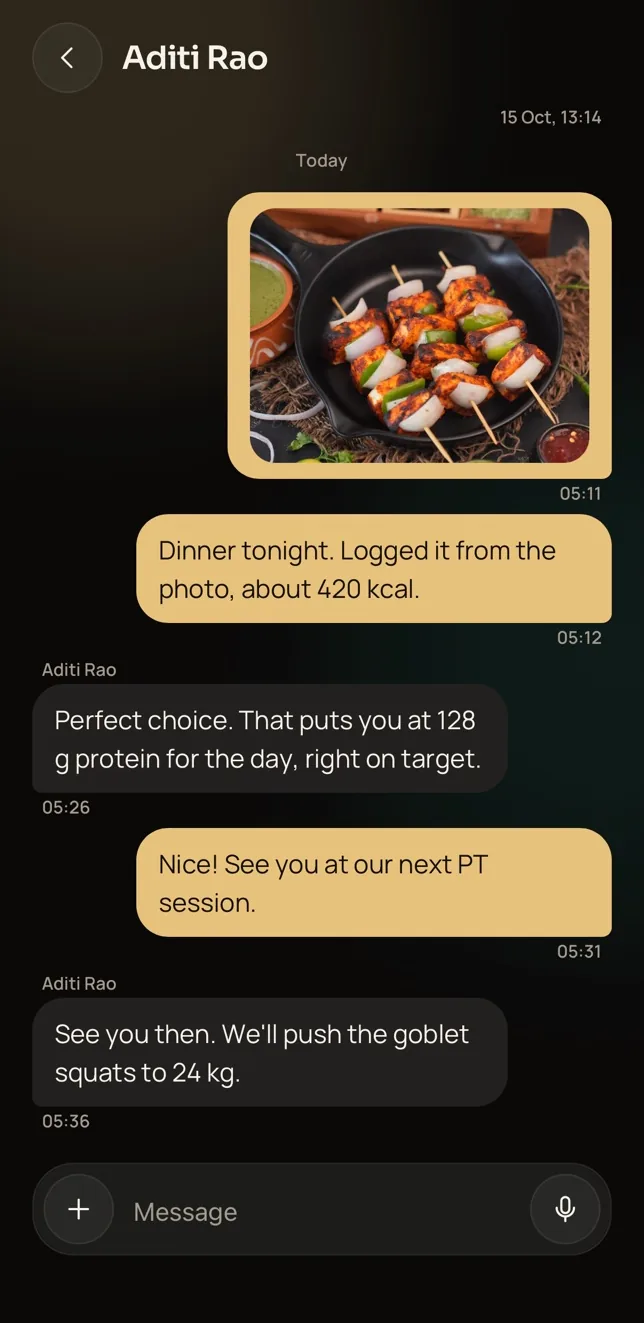
Confirmed meals land in your food log, where your coach sees what you ate against the calorie and macro targets they set for you. If a day looks off, they can ask about it in chat, and you can send a meal photo straight to them there too.
Can you search foods or scan a barcode instead?
Yes. Besides photos, Trainaq's Food tab lets you search for a food or scan a packet's barcode, with packaged-food data from Open Food Facts. Indian foods come in household measures such as a katori or a roti, so you can log a meal the way you actually served it rather than converting everything to grams.
Which method to use when
Photo: home-cooked plates, thalis and mixed meals, where typing each item would take ages.
Search: a single food you know well, such as a bowl of curd, a banana or a glass of milk.
Barcode: packaged foods such as biscuits, namkeen, protein bars, ready-to-eat meals and your whey tub. If a barcode isn't recognised, search for the food instead.
Household measures: when you know your portion as "2 rotis" or "1 katori dal" and don't own a scale.
How do you log Indian meals honestly?
Log honestly by recording meals as you eat them, counting the cooking fat, drinks and extras, and logging the bad days as well as the good ones. Your coach can only adjust your plan from what's in the log, so an honest, slightly messy record helps you more than a perfect-looking one.
Photograph before you eat. Once the plate is half-empty, neither you nor the AI can judge the amount.
Count the extras. Chutney, pickle, papad, ghee on the roti, sugar in your chai and the handful of namkeen at tea time all add up.
Calibrate once. Use the weights you found for your own katori and roti every time you confirm an amount.
Log the second helping. Add it as a new entry rather than quietly leaving it out.
Keep logging at weddings and functions. A rough estimate of a buffet plate is far more useful than a blank day.
Assume restaurant food is richer. Delivery and restaurant versions of a dish often carry more oil, butter and cream than the home version, so when unsure, round the amount up rather than down.
Don't tidy the log to look good. Your coach can't help with a meal they never see.
Watch protein, not just calories. For vegetarians especially, the macros on your Today screen show by evening whether dal, paneer, curd or a scoop of whey has done its job.
Treat the AI's reading as a fast first draft. It reads the food and estimates the amount, but it can't see hidden oil, sugar or a roti tucked under another, which is why you confirm every entry. Checking the amount against your own katori helps a lot.
Can I log packaged foods and supplements?
Yes. Scan the barcode to look the product up in Open Food Facts, or search for it by name. If a product isn't found, pick the closest match or ask your coach how they'd like it logged.
Do I have to weigh my food?
No. Indian foods come in household measures such as a katori or a roti, so you can log without a scale. A one-time check of your own katori, as described above, still makes every later entry more accurate.
Can I use Trainaq as a calorie counter without a coach?
No. The Trainaq app is free for clients, but it's built to work with a coach on Trainaq Coach, who sets your targets and reviews your log. If you'd like to use it and your trainer isn't on Trainaq, ask them to take a look at the coach app.
How do you start logging meals with Trainaq?
Logging starts with your coach's invite link: open it, get the free Trainaq app and you're connected to your coach. From then on, you can photograph, search or scan every meal against the targets they set. Trainer not on Trainaq yet? Send them Trainaq Coach on Google Play; plans start with a 7-day free trial, no card required.
Once you're in, log tomorrow's breakfast as your first photo and see how close the AI gets.